
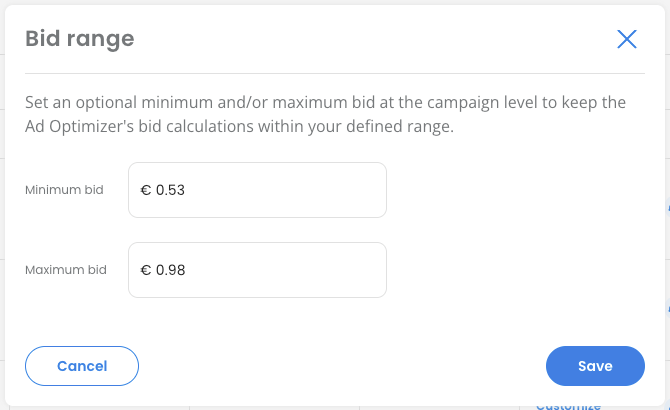
You can now set an optional minimum and/or maximum bid for each campaign. The Ad Optimizer keeps all bid calculations for that campaign within your defined range.
What's new
Campaign creation & update
Campaign Manager
Set a Min. bid and/or Max. bid in your marketplace currency. Both values must be greater than 0, the Max. bid must be equal to or higher than the Min. bid, and both must stay within Amazon's bid limits for the respective marketplace and campaign type.
During campaign creation, the bid range can be set in the section now called "Targeting and Bid Settings" for SP, SB (Collections), SB (Store Spotlight), and SD (Image) campaigns. For all existing campaigns, open the bid range setting directly from the Campaigns table.
Bulk import*
Min. bid and Max. bid can also be set, updated, or removed via the campaigns bulk import file.
Changes take effect from the next optimization cycle.
Campaigns table
Bid settings column
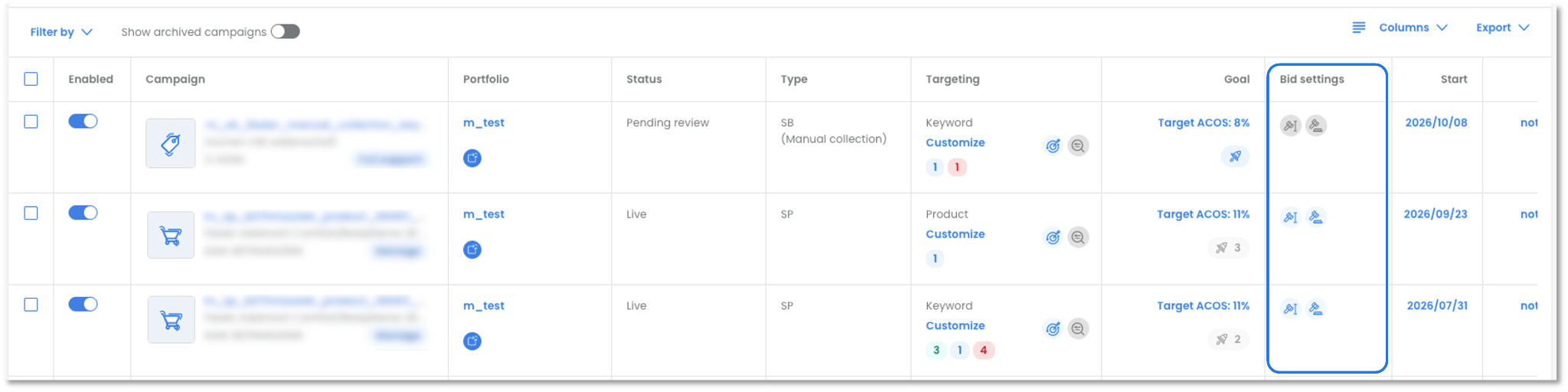
A new column "Bid settings" has been added after "Target ACOS", which shows "Bid Range" and "Bid Adjustments" together. Bid Adjustments have moved here from the "Targeting" column. A blue icon indicates that a bid range has been set, while a grey icon indicates that no bid range settings have been made.
To view this column, open "Manage columns" and select "Bid settings".Bid range filter
A new filter “Bid range” is available in the filter menu. It allows filtering for campaigns with or without bid range settings.
Combination with other settings
Advanced Target Settings
If a campaign with a bid range also has Advanced Target Settings, the Advanced Target Settings take priority over the bid range on target level.Campaign Boosts
Target ACOS Boost
During a Target ACOS Boost, the bid optimization respects the bid range. If bids should be raised or lowered beyond the range during the boost, disable the bid range for the boost period.Visibility Boost and Efficiency Boost
Bid ranges are not applied during the boost period.
Changelog
All changes to a campaign's bid range are recorded in the Changelog, showing the previous and new Min. bid and Max. bid values.
Campaign Insights Report
A new "Bid Range Settings" filter in the Performance and Benchmarking tabs lets you compare campaigns with and without a bid range.
Important note: A bid range can only be set for campaigns with a Target ACOS and the Management option "Full support" or "Manage".
* If you use bulk import, download the updated bulk import template "Campaigns" before your next import — the template has been updated to include the new columns “Min. bid” and “Max. bid”.